Product
Cart Experiments: A/B test your Shopify cart drawer at scale
Run A/B tests on your Shopify cart drawer and see which version drives more orders and higher AOV. Pick a winner and roll it out in one click.
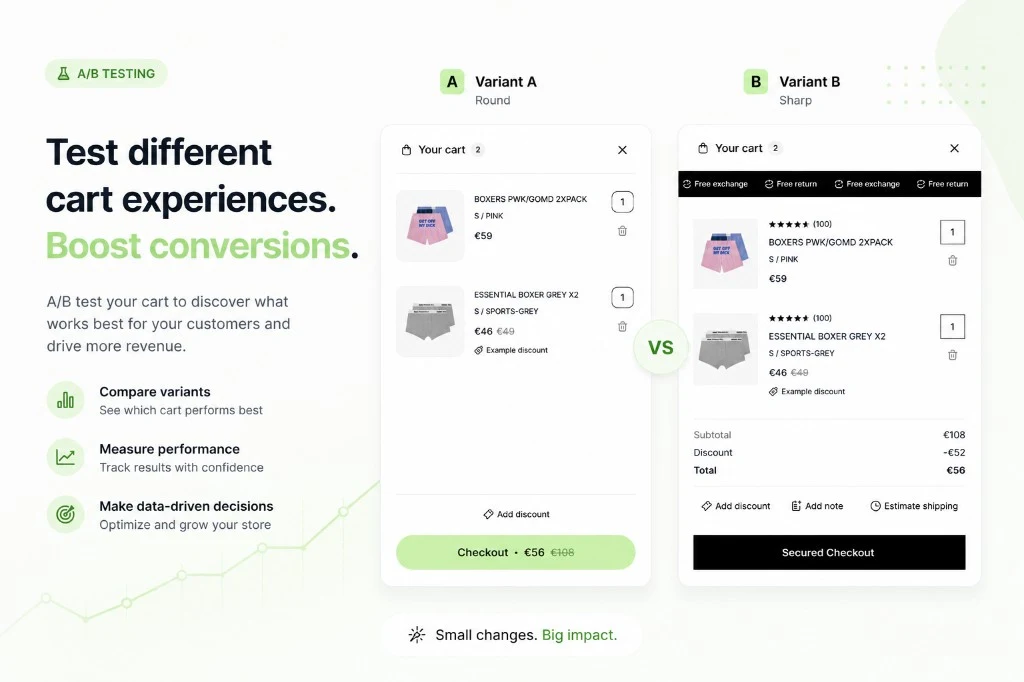
Most Shopify brands spend years testing ad creatives, landing pages, and PDPs. The cart drawer - the last step before checkout - gets treated as a given. It loads, it works, nobody touches it.
That is leaving money on the table. For brands doing real volume, the cart drawer is where hesitation lives. It is where shoppers weigh up whether the total feels right, whether they trust the checkout, whether a cross-sell catches their eye or kills the moment. A 5% improvement in cart-to-order conversion at scale is not a rounding error.
Until now, running a proper A/B test on the cart drawer meant patching a JavaScript overlay on top of your theme, accepting that the control and treatment would never be identical, and hoping your analytics platform could isolate the signal from the noise. Cart Experiments is a different approach.
Why generic A/B tools fall short for the cart
Tools like Optimizely or VWO are great for testing page copy and button colors. The cart drawer is a different problem.
Those tools work by painting a new look on top of what already exists. For the cart drawer, that means both variants are still running the same underlying cart — you just changed how it looks. You cannot test whether a completely different layout converts better, or whether removing a section changes behavior, because both variants are actually the same cart underneath.
Cart Experiments is built into Upnova. Control and Treatment are both fully working cart drawers, not one cart with a disguise on top. What you test is what shoppers actually experience.
Introducing Cart Experiments
Cart Experiments is built into the Upnova admin. One experiment = one comparison: a locked Control (your current live cart, unchanged) vs a Treatment (a new cart configuration you design).
The Control is locked by design. Every experiment starts with your production cart as the baseline. You cannot accidentally break your live cart by editing the wrong variant.
The Treatment uses the exact same cart editor surface as your main cart settings - the template picker, all template settings, and the live preview. If you know how to configure an Upnova cart, you already know how to set up a treatment variant.
What you can test
Any cart setting is fair game for the Treatment. Here are the tests agencies run most often:
- Cart template - switch between compact and default layouts, or a brand-specific template if you have one
- Goal bar - free shipping threshold vs order-volume tier vs no goal bar at all
- Trust signals - shipping protection display, checkout button copy, trust badges
- Announcement bar - always visible vs collapsed, copy changes
- Checkout content - what appears between the cart lines and the checkout button
You can run one Cart Experiment at a time per store. Upnova also has a separate system for testing upsell offers - free gifts, bundles, and similar promotions. Both can run at the same time.
Traffic split and shopper assignment
When you create an experiment, you choose what percentage of shoppers see the Treatment. The slider moves in 5% steps between 10% and 90%. The remaining traffic stays on Control.
Each shopper is consistently shown the same variant every time they visit. A shopper who sees Treatment on their first visit will always see Treatment for the life of the experiment - never a mix of both.
This matters for agencies managing client reporting. You are not measuring first-click reactions. You are measuring the full purchase path for a consistent cohort of shoppers on each variant.
Set up your experiment before a traffic spike (sale, email campaign, influencer post) so you hit statistical volume faster. A 50/50 split gives you the most data in the shortest time. Narrow splits (e.g. 10/90) are useful when the Treatment is experimental and you want to limit exposure.
Measurement that matches how you report
The results dashboard shows per-variant metrics side by side. For each variant you see:
- Sessions - unique shopper sessions exposed to the variant
- Cart opens - sessions where the cart drawer was opened
- Add to carts - items added during cart-open sessions
- Checkouts initiated - sessions that reached checkout
- Orders placed - completed purchases attributed to the variant
- Conversion rate - orders placed / sessions
- Average order value - revenue per completed order
- Average cart total - cart value at the point of order
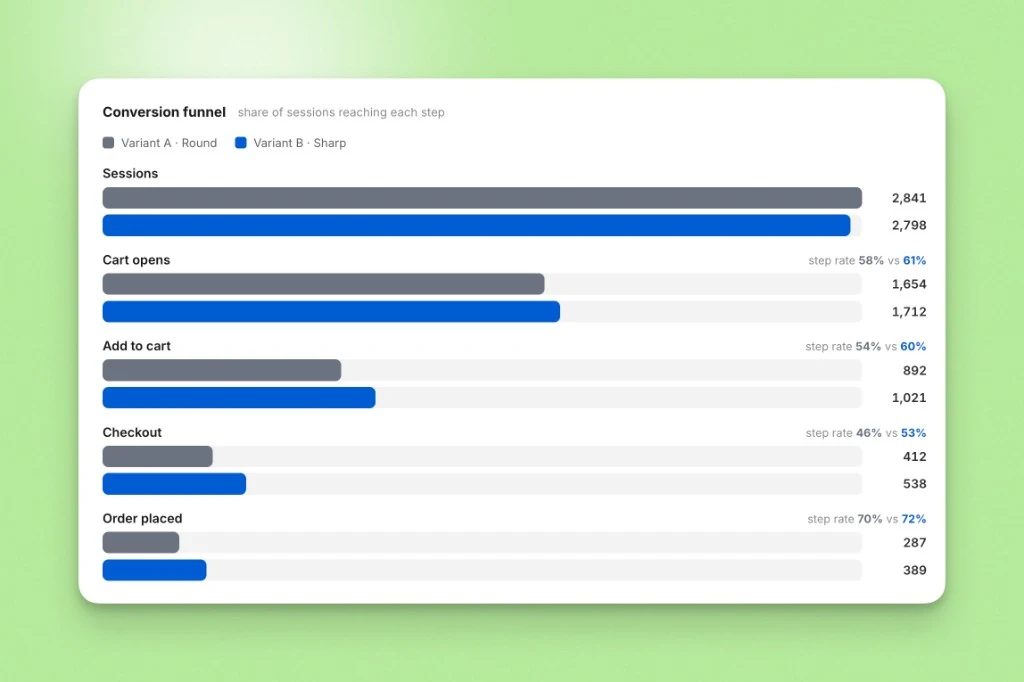
A few things worth being direct about: today, declaring a winner is a manual judgment call. There is no automatic significance calculator in the UI. All metrics are shown for both variants regardless of which conversion goal you selected when creating the experiment. You look at the data, compare the variants, and make the call.
For most agencies, this is actually the right workflow. Statistical significance thresholds matter, but so does the magnitude of the effect, the quality of the traffic during the test period, and whether any external events skewed the results in one direction. The data is yours to interpret.
Shipping the winner
When you are ready to call the experiment, go to the experiment detail page and click Complete. You pick which variant wins. If Treatment wins, its cart settings are rolled into your live cart for all shoppers from that point forward. If Control wins, nothing changes in your live settings - the experiment closes and your cart stays as-is.
There is no partial rollout at completion. The winning settings become the new baseline for 100% of shoppers. From here you can start a new experiment with the winning settings as the new Control.
Cart Experiments vs Offer Experiments
Upnova has two separate A/B testing systems. They test different things and are designed to run alongside each other.
| Cart Experiments | Offer Experiments | |
|---|---|---|
| What is tested | Cart layout, design, and trust signals | Free gifts, bundles, and upsell promotions |
| Control | Always your current live cart | Configured per variant |
| Metrics | Sessions, orders, AOV, conversion rate | Orders and AOV per variant |
| Winner selection | Manual pick | Manual pick |
Use Cart Experiments to test how your cart looks and feels. Use Offer Experiments to test which promotions drive more orders. Both can run at the same time.
For agencies: a practical playbook
If you manage multiple Shopify stores on Upnova, here is how to get the most out of Cart Experiments:
Always start from the client’s live cart. Control is locked to how the cart looks when you create the experiment. Avoid changing the live cart mid-experiment - it skews the comparison.
Run a cart test and offer tests at the same time. Both experiment types run independently, so you can have both active at once. More tests running means more signal per month.
Pause, do not abandon. If a client goes into a sale or a major promotional period, pause the experiment rather than completing it prematurely. Pausing preserves the configuration and the data so far. You can resume after the promotional window closes.
Name variants so they make sense in a report. Use clear treatment names your client will understand at a glance (“Compact layout” vs “With trust badges”). The names appear in the results dashboard.
Plan access before the project starts. Cart Experiments is available on eligible plans. Check with your Upnova account contact to confirm access before scoping a testing roadmap for a client.
The fastest way to get signal is to test a structural difference - switching cart templates, or adding a goal bar where none existed. Minor copy changes (button text, micro-copy) take longer to reach significance. Start with the change most likely to move conversion, then layer in smaller tests.
FAQ
Do shoppers know they are in a test?
No. The cart drawer renders normally for both variants. There is no banner, no disclosure, and no observable difference from the shopper’s perspective beyond the cart layout itself.
Can I run multiple experiments at the same time?
You can run one Cart Experiment per store at a time. You can run Cart Experiments alongside Offer Experiments - they are separate systems and assign shoppers independently.
What happens if I pause an experiment?
All shoppers revert to the Control (your live cart settings) when an experiment is paused. Their assignment is preserved - if the experiment resumes, they return to the same variant they were on before the pause.
How is this different from Offer Experiments?
Offer Experiments let you test upsell promotions - free gifts, bundles, and similar offers. Cart Experiments tests the cart drawer itself - layout, design, and trust signals. They are separate features that work well together.
How long should I run an experiment before calling a winner?
It depends on your traffic. As a rough guide, aim for at least 500 sessions per variant before drawing conclusions. At high traffic volumes (10,000+ sessions per week per variant), you can call results faster. For lower-traffic stores, run for at least two weeks to capture weekend versus weekday behavior.

14-day AOV growth guarantee
Ready to test your Shopify store offer for Black Friday?
Built from your store's data.
Read next
More from the blog
-
 Growth
 3 BFCM Offer Types That Grow Your Average Order Value, Not Decrease It
The three data-driven upsell offers Shopify merchants run for Black Friday: free gift tiers, a bundle builder, and an order-volume progress bar.
Read more - Guide
Best Shopify Upsell Apps for 2026, Ranked by AOV Impact
We ranked 13 Shopify upsell apps by verified AOV impact, not install counts. Find the right app for your funnel leak: PDP bundles, cart drawer, or post-purchase.
Read more -
 Product
 Introducing Popup Upsell
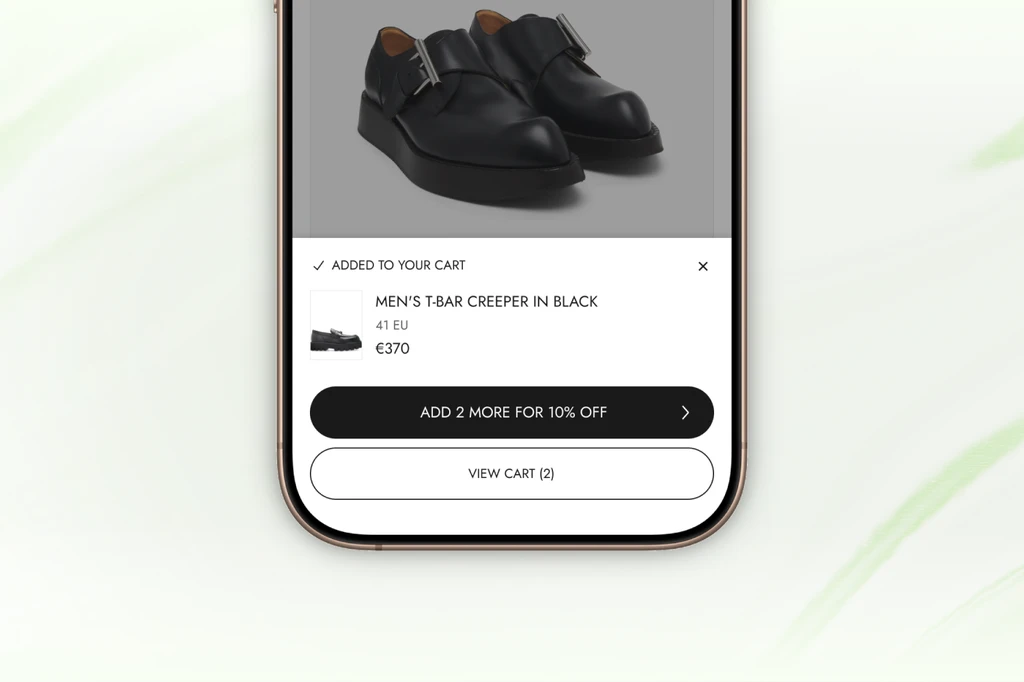
The moment a shopper adds to cart is the highest intent they'll ever have. Popup Upsell captures it and turns single-item orders into bigger baskets, without sending shoppers anywhere.
Read more